Neezy Trail Private
Forms with a memory. In your Workspace.
How it works
Create your form from a template, or in a Sheet
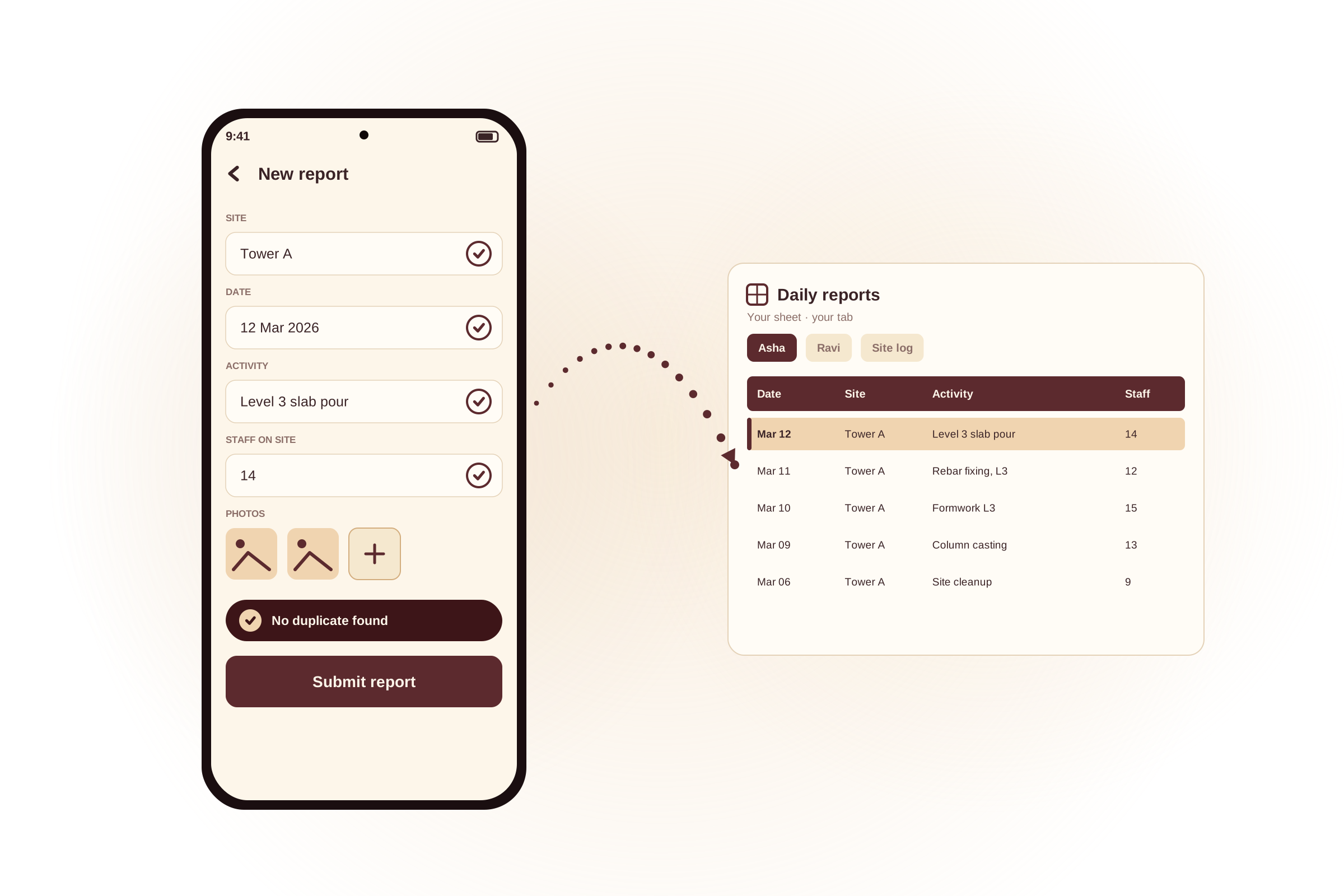
Pick a ready-made template in the app and adjust the questions, drop-down choices and the rules each answer must follow - the app sets up the Google Sheet for you. Prefer to build it by hand? Set the sheet up yourself. Either way, you choose which fields show on each entry in the home-screen list each person will see.
Invite others, or use it on your own
Using the form on your own? You are ready as soon as you have created it; there is nothing to share. To bring in a team, share the sheet with their Google accounts and send them the link. Each person pastes the link into the app once on first sign-in to connect the form. Only people you have shared the sheet with can open it. You can revoke access by unsharing the sheet.
Answers come back to your sheet
Every submission lands directly in your Google Sheet, in that person's own tab. Files attached to answers are saved in your Google Drive.
Features
Your own searchable submission history
Every time you sign in, the home screen shows your past submissions. Search them on the fields the form owner has chosen, open any one to read every detail, then start a new submission knowing exactly what you have already sent.
Catches mistakes before you submit
The form owner can set rules for every question - required fields, length and value ranges, file count, file size limits, allowed file types. The app checks each rule on the spot, so problems are fixed before the entry is sent.
Stops accidental duplicate submissions
If you accidentally submit the same answers twice, the app spots it before sending and tells you, so the form owner does not get duplicate entries.
A home-screen list tailored to your form
The form owner chooses which fields show up on each entry in your history list, so at a glance you see the bits that matter for your work, not just a date and a row number.
Create a form in minutes
Start from a ready-made template, adjust the questions and rules to fit your work and the app builds the Google Sheet behind it for you. No need to set up a sheet by hand before you begin.
The form lives in your Google Sheet
Questions, drop-down choices and the rules each answer must follow are all set up in a Google Sheet the form owner controls. Change the sheet, the form changes - no app update needed.
Built for people who care about privacy
Your data goes straight to the form owner
Your answers and any files you attach are saved directly into the form owner's Google account. They do not pass through any server we operate.
Only you and the people you invite can open the form
Signing in with a Google account on its own opens nothing. A form opens only for you and anyone its owner has shared it with, and that access can be removed at any time by unsharing the sheet - no password for anyone to manage or reset.
No ads, no data sale
We never show ads, never sell your data and never share your form answers or files with any other company. We do collect a small amount of crash and usage information that helps us diagnose problems in the app; full details are in the privacy section below.
The app can only touch what it creates
When you attach files, the app saves them to the form owner's Google Drive using a permission that only lets it open files the app itself created. It cannot read, change or even see any of your other files in Drive.


Get started Neezy Trail Private
An Android app for individuals and teams who fill the same form again and again - daily reports, expense logs, inspections, attendance. Each person sees their own submission history on the home screen and can search past entries. The form lives in a Google Sheet that the form owner can change at any time, with no app update needed.
GET IT ONGoogle Play