Your photos. On your USB drive. Always.
Back up your photos and videos to a USB drive - no cloud, no account, no internet needed.
How it works
-
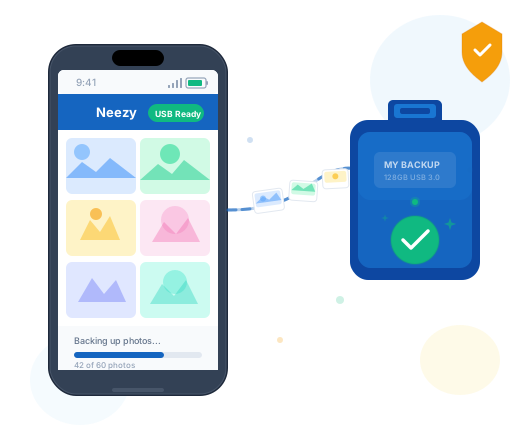
Plug in your USB drive
Connect any USB drive to your Android phone using a USB-C or micro-USB OTG adapter.
-
Tap Backup Now
Neezy scans your selected folders and copies only new photos. Files already backed up are automatically skipped.
-
Done - your photos are safe
Your photos are now on your USB drive. Remove it and store it anywhere. Nothing was uploaded to any server.
Everything you need to keep your photos safe
-
Instant backup
Copies only new photos. Files already backed up are automatically skipped.
-
Fully offline
No internet, no cloud, no account needed. Your photos never leave your device.
-
Stays local
Photos go directly to your USB drive. Nothing is uploaded anywhere.
-
All your folders
Camera, Screenshots, WhatsApp, any folder. Kavach unlocks all folders.
Kavach -
Auto-backup
Plug in USB, backup starts automatically. No need to open the app.
Kavach -
Backup history
See exactly what was copied, when, and the result of every session.


Free vs Kavach
Free
Forever free
- 20 photos/day (first backup unlimited)
- Camera folder
- 3 backup pairs
- Manual backup only
- All folders
- Auto-backup
- No ads


Kavach
Upgrade anytime in the app
- Unlimited photos and videos
- All folders
- Unlimited pairs
- Auto-backup
- No ads
Upgrade to Kavach anytime inside the app. Payments handled securely by Google Play.
Built for people who care about privacy
-
No cloud upload
Your photos are copied directly to your USB drive. Nothing is ever uploaded to any server.
-
No account required
Use the free tier with zero sign-in. Google account is only needed for Kavach purchase.
-
No internet needed
Backups work completely offline. The only internet use is for Kavach license verification.
-
No photo tracking
We never read your file names, photo content, or folder paths. Your data stays private.


